
Themes
This lesson is called Themes, part of the R in 3 Months (Fall 2022) course. This lesson is called Themes, part of the R in 3 Months (Fall 2022) course.
Transcript
Click on the transcript to go to that point in the video. Please note that transcripts are auto generated and may contain minor inaccuracies.
Loading transcript...
Your Turn
Complete the themes sections of the data-visualization-exercises.Rmd file.
Learn More
Themes Resources
Data Visualization: A Practical Introduction has a section on themes in Chapter 8. R for Data Science covers them in Chapter 28.
If you’re looking for packages that give you extra themes, in addition to ggthemes and hrbrthemes, check out bbcplot, which lets you make plots in the style of the BBC, firatheme, and a fun one called ggpomological, which lets you make plots that look like this:
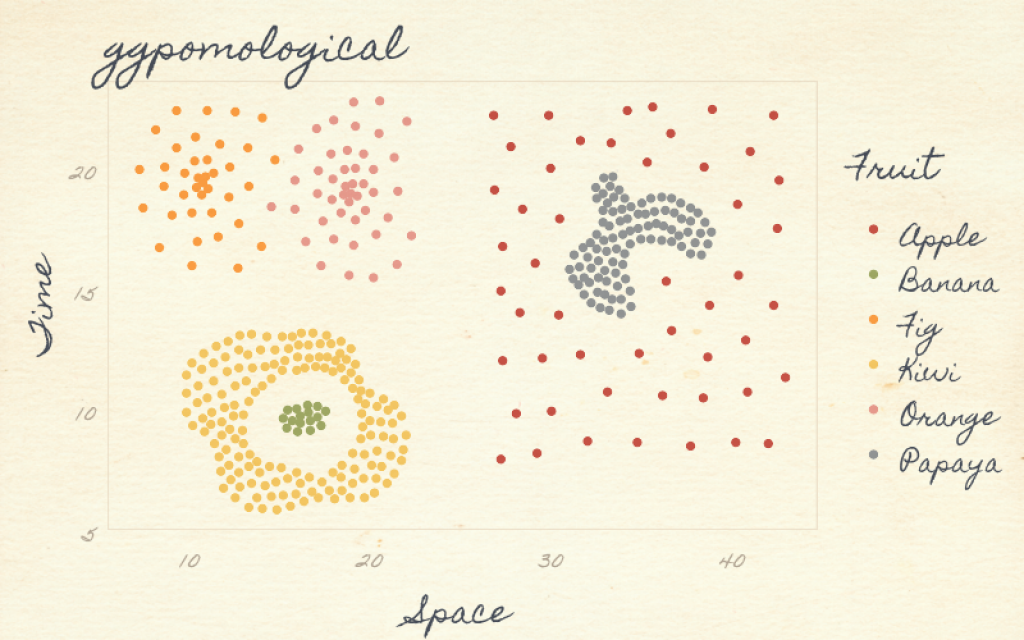
Note that theme packages often include code that changes to overall look and feel as well as palettes that you can apply to the color and fill scales.
Have any questions? Put them below and we will help you out!
Course Content
142 Lessons
You need to be signed-in to comment on this post. Login.
Oindrila Bhattacharyya • March 25, 2021
After installing hrbrthemes through devtools, when I add theme_ipsum, it shows me these series of error messages: font family not found in Windows font database font family not found in Windows font database font family not found in Windows font database
What should I do?
Catherine White • April 10, 2021
When I ran devtools::install_github("hrbrmstr/hrbrthemes") I received the following message:
package ‘vctrs’ successfully unpacked and MD5 sums checked Error: Failed to install 'hrbrthemes' from GitHub: (converted from warning) cannot remove prior installation of package ‘vctrs’
I looked for something called "vctrs" but couldn't find it. Any ideas for how I might resolve this issue? Thank you!
Lisa Janz • May 12, 2021
Can you explain how to load additional fonts on this forum so that we can complete the exercises for the course?
Matthew Makel • October 10, 2021
When trying to install the package I got the warning: WARNING: Rtools is required to build R packages, but is not currently installed.
Please download and install Rtools 4.0 from https://cran.r-project.org/bin/windows/Rtools/. Downloading GitHub repo hrbrmstr/hrbrthemes@HEAD
But when I go to packages in the console and look up rtools, no results.
Blayne Beacham • October 10, 2021
I did a little research and made my own 'theme' but the one annoying this is that I need to place it at the top of all scripts and it is quite a bit of text. Is there a way to sort of 'call' the theme without having to add the long chunk of code for the theme?
Also, if adding fonts, we have to be mindful that others who we share it with may not have that font on their system right? If so, can we pick the back-up font as a default (like the in .css)?
Acarilia Eduardo • May 5, 2022
I've resumed my study today after one week, and now I am getting this message "Error in ggplot(data = sleep_by_gender, mapping = aes(x = gender, y = avg_sleep, : object 'sleep_by_gender' not found"
I understand that the variable "sleep_by_gender" cannot be found even though we/I created it in previous exercises of this course. How come R cannot find it anymore even though I had saved each exercise after running them? What should I do now to be able to move on? (I keep RStudio open on my laptop at all times)
Thank you for your patience in advance.
Hannah Ridenour • October 11, 2022
I installed the ragg and systemfonts packages to attempt to resolve the font issue mentioned by others regarding theme_ipsum. However, it appears to have messed up tidyverse in doing so. I tried to re-install tidyverse but am still getting the following error message with library(tidyverse):
Error: package or namespace load failed for ‘tidyverse’ in loadNamespace(i, c(lib.loc, .libPaths()), versionCheck = vI[[i]]): namespace ‘rlang’ 1.0.5 is already loaded, but >= 1.0.6 is required
What should my next step be?
Melissa Mullins • April 19, 2023
I see that a bunch of people in the past got this same error message that I did: Warning: font family not found in Windows font database I wouldn't care about it, except that the resulting plot had the title so large it got cut off (it was fine in the previous default theme). I looked at the two references below, but that's a lot deeper in the weeds than I want to go- I just want the easy button when it comes to fonts/ themes and applying them (if there is such a thing). Look forward to learning more!