
Create a Custom Theme
This lesson is called Create a Custom Theme, part of the R in 3 Months (Spring 2025) course. This lesson is called Create a Custom Theme, part of the R in 3 Months (Spring 2025) course.
Transcript
Click on the transcript to go to that point in the video. Please note that transcripts are auto generated and may contain minor inaccuracies.
Loading transcript...
View code shown in video
# Load Packages -----------------------------------------------------------

library(tidyverse)
library(fs)
library(scales)
library(ggrepel)
library(ggtext)

# Create Directory --------------------------------------------------------

dir_create("data")

# Download Data -----------------------------------------------------------

# download.file("https://github.com/rfortherestofus/going-deeper-v2/raw/main/data/third_grade_math_proficiency.rds",
#               mode = "wb",
#               destfile = "data/third_grade_math_proficiency.rds")

# Import Data -------------------------------------------------------------

third_grade_math_proficiency <-
  read_rds("data/third_grade_math_proficiency.rds") |>
  select(academic_year, school, school_id, district, proficiency_level, number_of_students) |>
  mutate(is_proficient = case_when(
    proficiency_level >= 3 ~ TRUE,
    .default = FALSE
  )) |>
  group_by(academic_year, school, district, school_id, is_proficient) |>
  summarize(number_of_students = sum(number_of_students, na.rm = TRUE)) |>
  ungroup() |>
  group_by(academic_year, school, district, school_id) |>
  mutate(percent_proficient = number_of_students / sum(number_of_students, na.rm = TRUE)) |>
  ungroup() |>
  filter(is_proficient == TRUE) |>
  select(academic_year, school, district, percent_proficient) |>
  rename(year = academic_year) |>
  mutate(percent_proficient = case_when(
    is.nan(percent_proficient) ~ NA,
    .default = percent_proficient
  )) |>
  mutate(percent_proficient_formatted = percent(percent_proficient,
                                                accuracy = 1))


# Theme -------------------------------------------------------------------

theme_dk <- function() {

  theme_minimal() +
    theme(axis.title = element_blank(),
          plot.title = element_markdown(),
          plot.title.position = "plot",
          panel.grid = element_blank(),
          axis.text = element_text(color = "grey60",
                                   size = 10),
          legend.position = "none")

}

# Plot --------------------------------------------------------------------

top_growth_school <-
  third_grade_math_proficiency |>
  filter(district == "Portland SD 1J") |>
  group_by(school) |>
  mutate(growth_from_previous_year = percent_proficient - lag(percent_proficient)) |>
  ungroup() |>
  drop_na(growth_from_previous_year) |>
  slice_max(order_by = growth_from_previous_year,
            n = 1) |>
  pull(school)

third_grade_math_proficiency |>
  filter(district == "Portland SD 1J") |>
  mutate(highlight_school = case_when(
    school == top_growth_school ~ "Y",
    .default = "N"
  )) |>
  mutate(percent_proficient_formatted = case_when(
    highlight_school == "Y" & year == "2021-2022" ~ str_glue("{percent_proficient_formatted} of students
                                                             were proficient
                                                             in {year}"),
    highlight_school == "Y" & year == "2018-2019" ~ percent_proficient_formatted,
    .default = NA
  )) |>
  mutate(school = fct_relevel(school, top_growth_school, after = Inf)) |>
  ggplot(aes(x = year,
             y = percent_proficient,
             group = school,
             color = highlight_school,
             label = percent_proficient_formatted)) +
  geom_line() +
  geom_text_repel(hjust = 0,
                  lineheight = 0.9,
                  direction = "x") +
  scale_color_manual(values = c(
    "N" = "grey90",
    "Y" = "orange"
  )) +
  scale_y_continuous(labels = percent_format()) +
  scale_x_discrete(expand = expansion(add = c(0.05, 0.5))) +
  annotate(geom = "text",
           x = 2.02,
           y = 0.6,
           hjust = 0,
           lineheight = 0.9,
           color = "grey70",
           label = str_glue("Each grey line
                            represents one school")) +
  labs(title = str_glue("<b style='color: orange;'>{top_growth_school}</b> showed large growth in math proficiency over the last two years")) +
theme_dk()Your Turn
Make your own custom theme and apply it to your plot.
If you want to confirm that it works with other plots, copy it to another project and try it there.
Learn More
If you want to see a bunch of complete themes ready for your use, I've written a blog post that may be of interest to you. If you want to dive deep on creating custom themes, Andrew Heiss has some great materials here. This talk by Cara Thompson is also great.
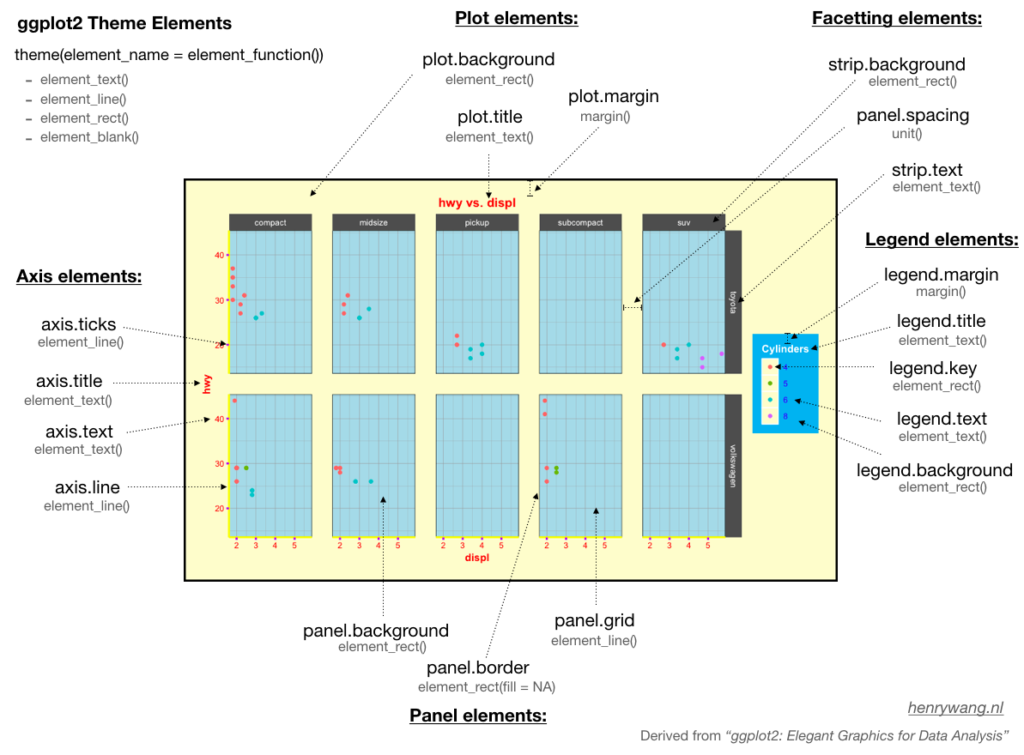
If you have trouble, as I do, remembering the various theme elements, this blog post from Henry Wang has a nice overview to help you.
Have any questions? Put them below and we will help you out!
Course Content
127 Lessons
You need to be signed-in to comment on this post. Login.