
Sign up for Discord
This lesson is called Sign up for Discord, part of the R in 3 Months (Spring 2026) course. This lesson is called Sign up for Discord, part of the R in 3 Months (Spring 2026) course.
We are going to use Discord as our community communication channel. We would love to see you there! Below you will find information about how to join and what you will find there.
If you already have an account, feel free to skip to step 4.
1. Where can I access Discord? Is it an app? Is it a website?
You can download Discord for free on desktop here, or through the Google Play store or Apple App Store on mobile and tablets. If you don't want to download the app, you can use the web client to access Discord directly from your browser.
Installation for Mac-OS | Installation for Windows | Installation for Linux
2. Cool! How do I sign up?
You can create your account on the Discord registration page, or in the app. Discord will send you an email to verify your account, so it’s important you check your email during sign-up and verify it.
3. Handle? Display name? What’s that?
Now we’ll introduce you to some jargon from Discord, but we promise there aren’t many! A handle is a unique identifier that we can use to find you on Discord. You can find that by looking at your profile. Find your profile photo and click/tap it to open your profile. Once in your profile, click or tap your name and your handle will be copied to your clipboard!
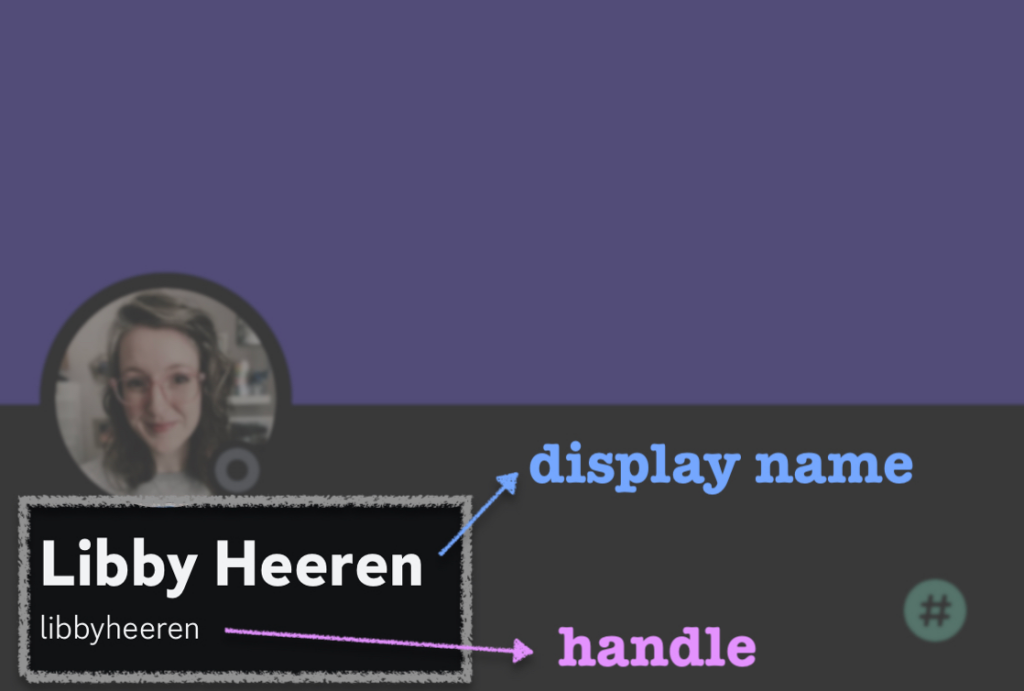
We will also need you to decide on your desired display name. This will be the name people see in the Discord community, so it should be a version of your real name.
Once you’ve done that, you will need to share your handle and your desired display name with us by updating your profile here in the course, so after you’ve joined the server we can assign you a role and welcome you to our online community!
4. Done! Now what?
Now you can join our server (which is the name for what you might know as “workspace” on Slack, similar to a server on mIRC) by clicking on this link (https://discord.gg/Q4MhRYCqQh). When you first enter the Discord server, you will not see any channels. Don’t panic! Once an admin has assigned you a role, you will see channels.
5. Ok, I got in and I have a role… What can I do there?
We are ✨SO THRILLED✨ that you have joined us! Here’s how you can make the most out of our Discord server:
Read the
ruleschannel! We’ve set up a channel with only one message, which is our rules channel. There you will find our Code of Conduct and information on how to contact us and what to do if you see something inappropriate happening.Learn the Discord basics on our
discord-basicschannel! We’ve created a channel only with tips and tricks on how to format your messages, how to send code, how to manage alerts, and more!Find help! You can reach out to an admin, a.k.a. coach, a.k.a. community manager at any time by tagging
@Gracielle Higino, or@Admin.Join channels and participate in discussions! You'll find channels pertaining to the three categories covered in the course:
quarto,data-wranglinganddata-viz. These channels are for us to debug together, and share suggestions, victories and frustrations. You might want to ask a question on the website, right below the video lesson you just watched, and if the answer is simple, we will answer there and invite everyone on Discord to check it out. If the answer requires more details and some back-and-forth debugging, we will bring the discussion to Discord and link the thread on the website.The
generalchat is for anything related to the program! It's where we will all hang out. We will introduce each other there, send announcements about the program, remind you about the live sessions and send weekly digests with the best of what happened on Discord in the past week!The
randomchannel is for things that may be off-topic or a random question about Discord or the program. Memes go here!There is also a
job-opportunitiesforum where you can feel free to share any job or internship opportunities you hear about! To create a job ad, just make the title the job role and the company name and put the link and any info in the body of the post. Example: Amazing Data Wrangler - Amazing Company X The Amazing Company X is looking for an amazing data wrangler to join their team! The salary is USD$ 1000000/year and you must have a diploma in amazingness. More info here: <link to the job ad>
That’s it! We can’t wait to see you on our Discord server! Remember to send us your handle and preferred display name as soon as you can so you can enjoy this amazing community as much as possible!
Your Turn
Create a Discord account, if you don't have one already.
Share your handle and preferred display name with us by adding them to your profile.
Join our server by clicking on this link (https://discord.gg/Q4MhRYCqQh). You won't be added right away (we check everyone's information to make sure you're part of R in 3 Months before letting you in).
Once you've been let in, say "hi" 👋 on our
generalchannel and tell us where you are joining us from!Go to the
randomchannel and answer to one of these questions:What’s the craziest fashion trend you ever rocked?
What did you get into the most trouble for with your parents as a kid?
What are your favourite songs from your teenage years that you still rock out to when nobody else is listening?
Have any questions? Put them below and we will help you out!
Course Content
144 Lessons
You need to be signed-in to comment on this post. Login.